Map Display of Observed Species
The izeltlabuak.hu website primarily focuses on arthropods found in Hungary. This entry also deals with Hungarian fauna.
Overview
From observation data, we automatically generate and display distribution maps for species. Similar to map display of a species' occurrences, we can also view occurrences of a species observed by a user displayed on a map.
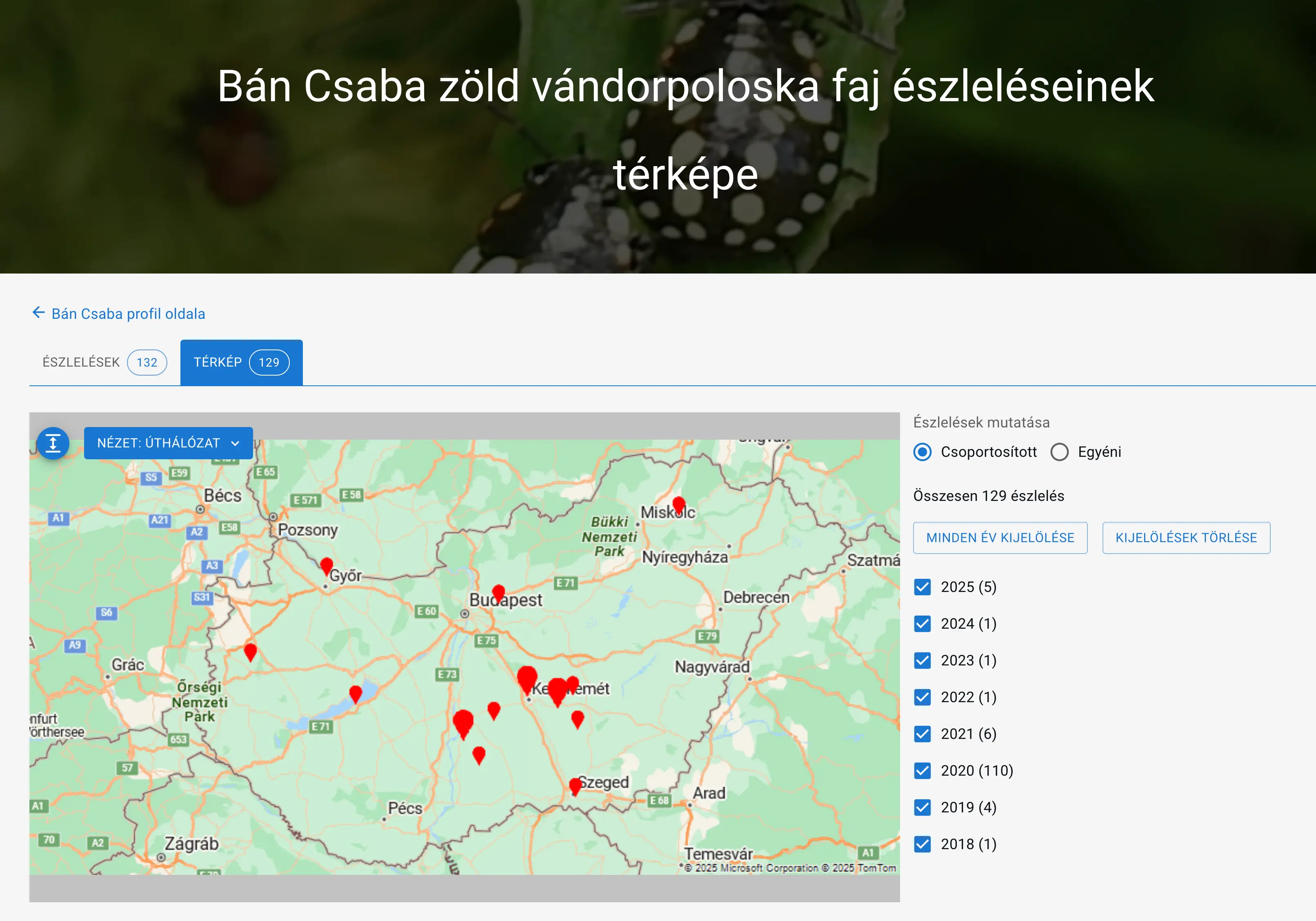 example: Csaba Bán's Nezara viridula - green stink bug species observations map display
Availability
Available on the user's observed categories page from a species page by clicking the 'Map' tab.
On the tab, we can see the number of observations displayed on the map.
Page Structure
Navigation
At the top of the page, we can proceed to
- the user's profile page
- the user's observations belonging to a given species by clicking the 'Observations' tab
Next to the map, we can change the grouped or individual display of observation points, and we can set which years' observations to display.
Observations outside Hungary also appear on the map.
Map Views
When arriving at the page, we see the distribution on the map as a static image. Observation points are marked with a drop. A larger drop indicates a greater number of recorded observations in that area.
With the icon visible in the top left corner of the map, we can switch to dynamic view. In this view, we can use the map's zoom in/out function, move the map, and change between grouped or individual display of observation points.
Grouped and Individual Display of Observation Points
To the right of the map, we can change the grouped or individual display of observation points. When changing between grouped or individual display of observations, or when changing yearly display, the map automatically switches to dynamic state.
In grouped display, observation points are marked with a circle containing a number showing the number of observations.
In individual display, observation points are shown separately with a circle, without numbers. Each circle represents one observation.
The display change is persistent, so if we once choose grouping, from then on observation points will always appear grouped on the map. If individual, then always in individual form.
Yearly Changes in Observations
On the right side of the map, we can see the list of years of observations. By selecting the appropriate year from the list, the map automatically displays observations belonging to that year.
Detailed Display of Observations
In dynamic view, by clicking on the circles marking observations, the observations appear below the map with images and detailed data.
Grid
For protected species, for species protection, observations on the map are shown with ETC_BD or UTM grid. On the profile settings other settings page we can choose between the two grids.
For these species, foreign observations are not visible on the map. By clicking on the points in this view, we can also see the observations belonging there in detail below the map.
Map Layers
In dynamic view, in the top left corner of the map, we can change the following layers:
- Road network
- Satellite
- Tourist
Layer changes are persistent, so if we once select one, from then on we will always get that layer.
Layer Providers
Map layers are supported by Microsoft and Google. Their support makes it possible to display distributions on maps.
On map pages, we can get layers from either of the two providers.